Override alert thresholds for individual nodes
Starting with PMM 3.10.0, you can change an alert rule’s threshold for individual nodes without editing or duplicating the rule. Use this when one alert rule applies to most nodes but a few need a different limit.
How dynamic thresholds work
A template can mark a threshold parameter as overridable. On the Alerts > Templates page, these templates carry a Dynamic badge. Among the built-in templates, pmm_node_high_cpu_load and pmm_qan_slow_queries carry this badge. You can also make a parameter overridable in a custom template.
When you create an alert rule from such a template:
- The threshold value you enter becomes the rule’s default for every node. It doesn’t change if you modify the rule later.
- An override replaces the default for one node, and the other nodes keep the default.
- Alert descriptions that include the threshold show the value in effect for the node that fired.
- Copies of a rule share the same overrides. To manage them separately, create a new rule from the template instead.
- If PMM Server is unavailable for more than 5 minutes, nodes with overrides fall back to the rule’s default until overrides are restored.

Prerequisites
Before you start, make sure that:
- You have the Admin role.
- Percona Alerting is enabled.
- The alert rule was created in PMM 3.10.0 or later from a template with a Dynamic badge, such as
pmm_node_high_cpu_load. To create one, see Add an alert rule based on a template.
Override a threshold for a node
To set a different threshold for one node:
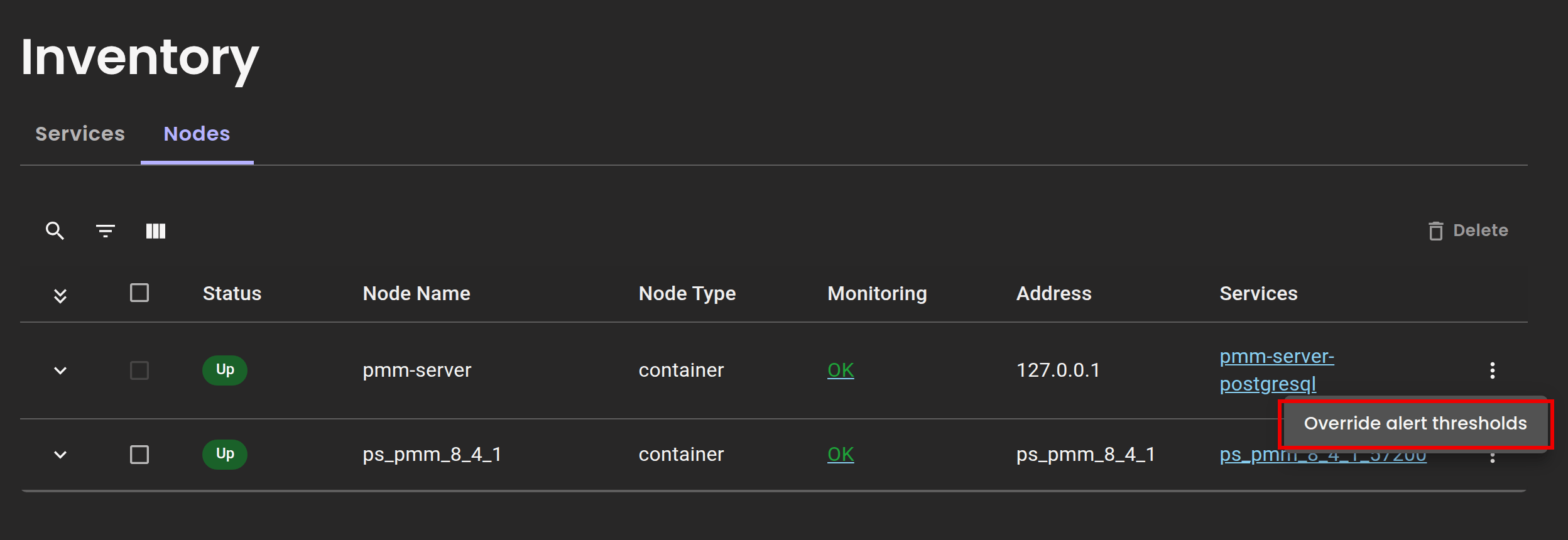
- Go to Inventory > Nodes.
-
Click the icon next to the node, then select Override alert thresholds.
-
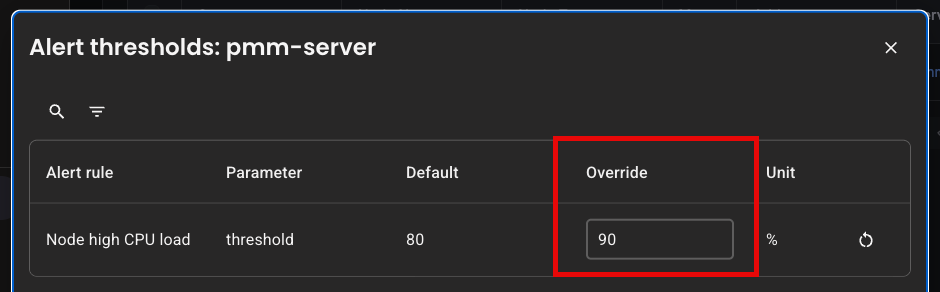
In the Override column, enter the threshold for this node. The value uses the unit in the Unit column and must be within the range that the template allows.
-
Click Submit changes. PMM shows Alert thresholds updated.
The alert rule uses the new threshold from its next evaluation, usually within a minute. The threshold must stay breached for the rule’s Duration before the alert fires.
If a value is out of range, correct it and click Submit changes again.
Reset a threshold to the default
To remove an override and return a node to the rule’s default:
- Go to Inventory > Nodes, click the icon next to the node, then select Override alert thresholds.
- Click the icon (Reset to default) next to the threshold, or clear the Override field.
- Click Submit changes.
Entering the default value removes the override. PMM does not store a copy of it.
Make a parameter overridable in a custom template
To enable overrides for a parameter in a custom template, the template must meet these requirements:
- uses queries, expressions, and condition instead of expr
- marks the parameter with
type: floatandoverridable: true - uses the parameter as the whole right-hand side of a comparison, for example
$A > [[ .threshold ]]; expressions like$A > [[ .threshold ]] * 100are rejected - compares the parameter against the same query in every expression that uses it
- keeps the
node_namelabel in query results, or anode_namecolumn for a ClickHouse query, so PMM can match each node to its override - reduces a ClickHouse query before the comparison, for example
$B > [[ .threshold ]]whereBis areduceexpression over the query
You can find every other field in the custom template fields.
Example: CPU load alert with an overridable threshold
templates:
  - name: custom_node_high_cpu_load
    version: 1
    summary: Node high CPU load
    queries:
      - ref_id: A
        expr: |-
          (1 - avg by(node_name) (rate(node_cpu_seconds_total{mode="idle"}[5m]))) * 100
    expressions:
      - ref_id: C
        type: math
        expression: "$A > [[ .threshold ]]"
    condition: C
    params:
      - name: threshold
        summary: A percentage from configured maximum
        unit: "%"
        type: float
        range: [0, 100]
        value: 80
        overridable: true
    for: 5m
    severity: warning
    annotations:
      summary: Node high CPU load ({{ $labels.node_name }})
      description: |-
        {{ $labels.node_name }} CPU load is more than [[ .threshold ]]%.
Limitations
Dynamic thresholds have the following limitations:
- Overrides apply to individual nodes only.
- Among the built-in templates, only
pmm_node_high_cpu_loadandpmm_qan_slow_queriessupport overrides. - When a rule compares a ClickHouse query with an overridable threshold, PMM applies the default threshold only to nodes that also send metrics. A node that sends only Query Analytics data gets no default threshold, so its alerts fire only if you set an override for it.
- Rules created before PMM 3.10.0 don’t support overrides. To enable them, make sure your template is Dynamic, then delete the rule and recreate it. If your template uses
expr, make it Dynamic first.
Automate threshold changes with the API
You can list, set, and clear thresholds with the PMM API, for example to apply the same overrides to many nodes at once. For the endpoints, see the alerting section of the PMM API reference.
Next steps
- Configure contact points to receive the alerts.
- Silence alerts during planned maintenance.
- Browse the alert template catalog.